
MariaDB - fail2ban configuration
Jul 30th
The firewall refused all the stuff and I am way too tired to deal with it ... here's a screenshot
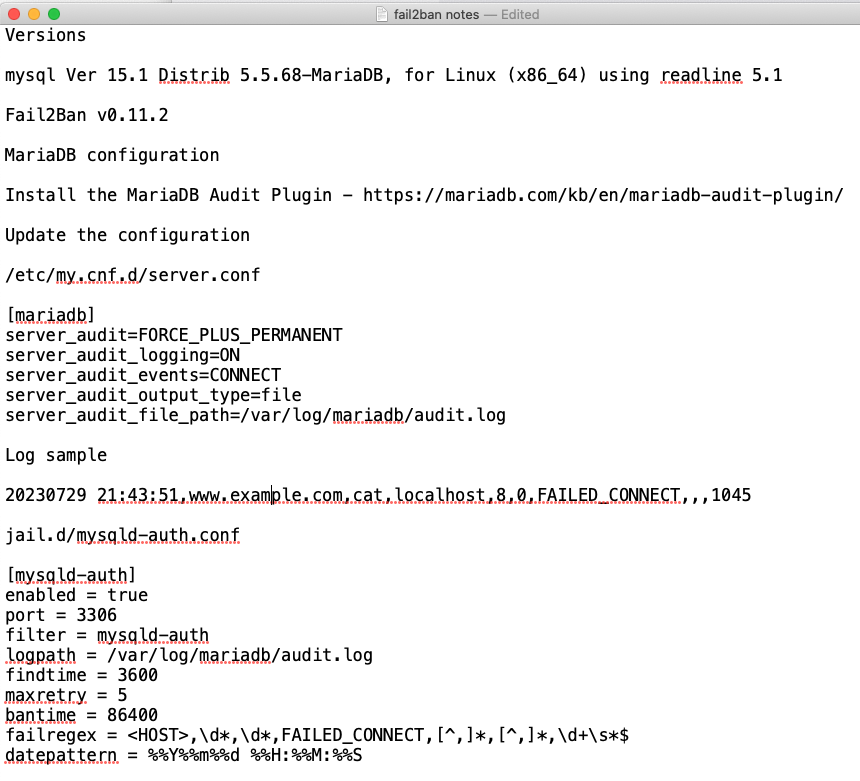
Keywords so the search engines will hopefully index it to help other people
- MariaDB
- fail2ban
- failregex
- datepattern
- mysqld-auth
- MariaDB Audit Plugin
ibexa - stimulus - webpack
Feb 13th
It's 4:20a - please excuse this post ...
I wanted to use the ibexa REST API to dump the content types
So - I needed to add some JavaScript. Stimulus was there, so I figured I'd use it. It's cool.
I haven't worked with this stuff ... ever
I had to upgrade webpack or encore or something
Which identified path issues in the ibexa CSS and SCSS
I was hoping it would be quicker to fix the issues than ... not fix them, so I tried and am posting the results here so that eventually I can fork the repo and make a proper pull request
If you're looking for a rough example of working with Stimulus, Symfony and the Ibexa REST API - https://github.com/bgamrat/improved-journey/commit/c2ee360c8167395e4a1d5af7992ea1e0bf921124
If you found this helpful - yay :)
vendor/ezsystems/ezplatform-admin-ui-assets/Resources/public/vendors/alloyeditor/dist/alloy-editor/assets/alloy-editor-atlas.css

3,7c3,7

< 	src:url('./fonts/alloyeditor-atlas.eot');

< 	src:url('./fonts/alloyeditor-atlas.eot?#iefix') format('embedded-opentype'),

< 		url('./fonts/alloyeditor-atlas.woff') format('woff'),

< 		url('./fonts/alloyeditor-atlas.ttf') format('truetype'),

< 		url('./fonts/alloyeditor-atlas.svg#alloyeditor-atlas') format('svg');

---

> 	src:url('fonts/alloyeditor-atlas.eot');

> 	src:url('fonts/alloyeditor-atlas.eot?#iefix') format('embedded-opentype'),

> 		url('fonts/alloyeditor-atlas.woff') format('woff'),

> 		url('fonts/alloyeditor-atlas.ttf') format('truetype'),

> 		url('fonts/alloyeditor-atlas.svg#alloyeditor-atlas') format('svg');


vendor/ezsystems/ezplatform-richtext/src/bundle/Resources/public/scss/_alloyeditor-ez.scss

3,7c3,7

<     src: url('../fonts/alloyeditor-ez.eot');

<     src: url('../fonts/alloyeditor-ez.eot?#iefix') format('embedded-opentype'),

<         url('../fonts/alloyeditor-ez.woff') format('woff'),

<         url('../fonts/alloyeditor-ez.ttf') format('truetype'),

<         url('../fonts/alloyeditor-ez.svg#alloyeditor-ez') format('svg');

---

>     src: url('/bundles/ezplatformrichtext/fonts/alloyeditor-ez.eot');

>     src: url('/bundles/ezplatformrichtext/fonts/alloyeditor-ez.eot?#iefix') format('embedded-opentype'),

>         url('/bundles/ezplatformrichtext/fonts/alloyeditor-ez.woff') format('woff'),

>         url('/bundles/ezplatformrichtext/fonts/alloyeditor-ez.ttf') format('truetype'),

>         url('/bundles/ezplatformrichtext/fonts/alloyeditor-ez.svg#alloyeditor-ez') format('svg');


vendor/ezsystems/ezplatform-admin-ui/src/bundle/Resources/public/scss/_preview.scss

115c115

<             background: url('../img/preview-tablet.png') top center no-repeat;

---

>             background: url('/bundles/ezplatformadminui/img/preview-tablet.png') top center no-repeat;

127c127

<             background: url('../img/preview-mobile.png') top center no-repeat;

---

>             background: url('/bundles/ezplatformadminui/img/preview-mobile.png') top center no-repeat;


vendor/ezsystems/ezplatform-admin-ui/src/bundle/Resources/public/scss/_login.scss

18c18

<         background-image: url('../img/login-background.jpg');

---

>         background-image: url('/bundles/ezplatformadminui/img/login-background.jpg');


vendor/ezsystems/ezplatform-admin-ui/src/bundle/Resources/public/scss/_error-page.scss

64c64

<             background-image: url('../img/errors/background.png');

---

>             background-image: url('/bundles/ezplatformadminui/img/errors/background.png');
Also - I had to reset my password for this blog for the umpteenth time ...
mod_proxy_ajp declining URL
Jan 5th
Many hours of searching and suffering were spent trying to resolve this ...
Apache-Error: [file "mod_proxy_ajp.c"] [line 743] [level 7] AH00894: declining URL fcgi://localhost/var/www/html/site/public/index.php
This is a Symfony application (ibexa DXP, formerly eZ Platform, previously eZ Publish), CentOS 8 server, with PHP 7.4, mod_security, selinux enabled, etc.
The error was thrown on the graphql requests to support the sub-items display of the admin interface.
The root cause of the issue was an application error.
The message from Symfony
[2022-01-05T18:34:58.709826+00:00] request.CRITICAL: Uncaught PHP Exception Overblog\GraphQLBundle\Resolver\UnresolvableException: "Could not found type with alias "RepositoryLanguage". Do you forget to define it?" at /var/www/html/site/vendor/overblog/graphql-bundle/src/Resolver/TypeResolver.php line 72 {"exception":"[object] (Overblog\\GraphQLBundle\\Resolver\\UnresolvableException(code: 0): Could not found type with alias \"RepositoryLanguage\". Do you forget to define it? at /var/www/html/site/vendor/overblog/graphql-bundle/src/Resolver/TypeResolver.php:72)"} []
This also took me a long time to unravel - about an hour ... because I haven't worked with eZ in a while
Solution was to copy all these files https://github.com/bgamrat/improved-journey/tree/main/config/graphql/types/ezplatform into the config.
Next, it was time to make this blog post with the goal of helping you!
I changed the username for security, to a word I rarely use. So of course I forgot it. As well as the password. Tried to email a password reset, but that failed too ... selinux, remember?
setsebool -P httpd_can_sendmail 1
I also tried to reset the password at the database level, but that looked like more effort.
So - it was a grand adventure, the installation works and I can go do other things.
Who is trying to log into my SSH?
Dec 17th
Who is trying to log into my SSH?
grep -i 'from invalid user' secure | sed "s/.* invalid user \([^ ]\+ [^ ]\+\) port .*/\1/i" | cut -f1 -d' ' | sort -u
and where are they coming from?
grep -i 'from invalid user' secure | sed "s/.* invalid user \([^ ]\+ [^ ]\+\) port .*/\1/i" | cut -f2 -d' ' | sort -u
Python3 - metadata extraction utilities
Dec 11th
EXIF
pip install exifread
#!/usr/bin/python3

import sys
import exifread

def main(argv):
	imagefile = ''
	if len(sys.argv) < 2:
		print('exif.py <imagefile>')
		sys.exit(1)

	imagefile = sys.argv[1]

	with open(imagefile,'rb') as imagefile:
		tags = exifread.process_file(imagefile)
		for key in tags:
			if key.find('Thumbnail') == -1:
				print(key,'->',tags[key])

main(sys.argv[1:])
.docx
pip install python-docx
#!/usr/bin/python3

import sys
import docx

def main(argv):
	docxfile = ''
	if len(sys.argv) < 2:
		print('dcx.py <docxfile>')
		sys.exit(1)

	docxfile = sys.argv[1]
	doc = docx.Document(docxfile)

	props = doc.core_properties
	for p in dir(props):
		attr = getattr(props,p)
		if not p.startswith('_') and not callable(attr):
			print(p,':',attr)

main(sys.argv[1:])
pip install pdfminer
#!/usr/bin/python3

import sys
from pdfminer.pdfparser import PDFParser
from pdfminer.pdfdocument import PDFDocument

def main(argv):
	pdffile = ''
	if len(sys.argv) < 2:
		print('pdf.py <pdffile>')
		sys.exit(1)

	pdffile = sys.argv[1]

	fp = open(pdffile, 'rb')
	parser = PDFParser(fp)
	doc = PDFDocument(parser)

	props = doc.info[0]
	for p in props:
		attr = props[p]
		if not p.startswith('_') and not callable(attr):
			print(p,':',attr)

main(sys.argv[1:])